Data Ingest Pipelines
Data Ingest Pipelines
Data Ingest Pipelines define how security data enters SOCAutomation.
This is the primary data input point into the system.
Each pipeline represents a configured inbound source and provides a consistent point of control for its integration type, configuration and enabled state.
Pipeline Purpose
A data ingest pipeline is the mechanism used to bring data from an external source into SOCAutomation. Pipelines can be created for the sources and delivery methods required by the environment, allowing different inbound feeds to be configured and managed independently.
The available methods depend on the integrations enabled for the deployment. These can include webhooks and REST-based APIs, third-party collection or forwarding pipelines, object-storage sources, streamed or file-based input, syslog and other supported delivery mechanisms.
Configured Pipelines
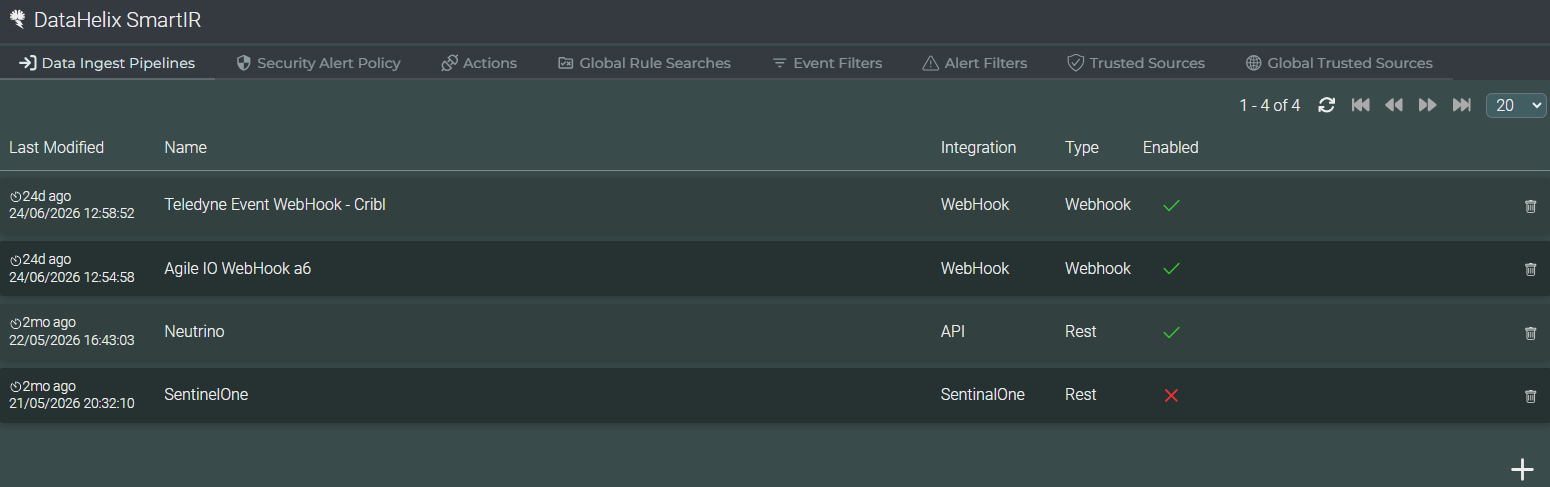
The main table lists the pipelines currently configured for the tenant. It provides the information needed to identify each source and confirm its operational state.
Last Modified
Shows when the pipeline configuration was last changed.
Name
Identifies the source or purpose of the pipeline using the name assigned during configuration.
Integration and Type
Shows the integration associated with the pipeline and the transport or connection type used to receive data.
Enabled
Indicates whether the pipeline is currently active. The delete control at the end of the row removes a pipeline that is no longer required.
Pipeline Configuration
Use the plus control at the lower-right of the page to create a pipeline. The first step is to select the required pipeline or integration type. SmartIR then presents the configuration fields appropriate to that selection.
Source type
Choose the connection or ingestion method that matches the system supplying the data.
Configuration details
Enter the source-specific details displayed for the selected integration. The fields vary because webhook, API and other delivery methods require different connection information.
Saved configuration
Save the completed configuration to add it to the pipeline list, where its type and enabled state can be reviewed.
Multiple pipelines
Create as many pipelines as required to support the different sources and ingestion methods used by the environment.
Source-specific configuration
The exact fields presented when a pipeline is created depend on the selected integration. Complete the information requested for that source and confirm the configuration before enabling it for operational use.
Video walkthrough placeholder
Add an embedded walkthrough for this section by inserting an <iframe> or <video> element and applying the is-visible class to this container.