CyberFlow
Using environment variables
Any node property can be set with an environment variable by setting its value to a string of the form ${ENV_VAR} . When the runtime loads the flows, it will substitute the value of that environment variable before passing it to the node.
Setting a node property
This only works if it replaces the entire property - it cannot be used to substitute
just part of the value. For example, it is not possible to use CLIENT-${HOST}.
As nodes provide their own edit dialog, not all properties will provide a text input that can be used to enter the env-var string. In that case, you may consider hand-editing the flow file to set the property.
Using the TypedInput widget
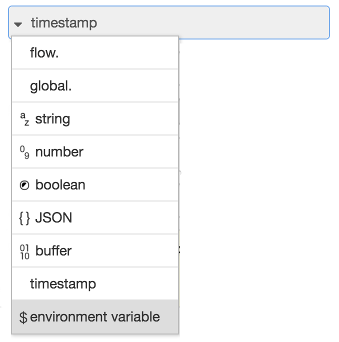
TypedInput Environment Variable type
Within the editor, the TypedInput widget can offer ‘environment variable’ as a type. When this type is selected, its value will be evaluated as follows:
-
if there is no
${}present, uses the whole value as the name of the environment variable. For example,"FOO"will be replaced with the value ofprocess.env.FOO -
if
${}is present, it will substitute the corresponding environment variable into the result: For example, given the value"Hello ${FOO}"and the env varFOOis set toWorld, this results in the value"Hello World"
JSONata Expressions
Environment variables can be accessed in JSONata expressions, such as in the Change
node, using the $env function:
$env('ENV_VAR')
Function node
Within a Function node, environment variables get be accessed using the env.get
function:
let foo = env.get("FOO");
Template node
Since CyberFlow 3.0
The template node can access environment variables using the syntax:
My favourite colour is {{env.COLOUR}}.
Subflow Instance properties
Since 0.20, Subflows can be configured with instance properties. These appear as environment variables within the Subflow and can be customised for individual instances of the subflow.
For example, given a REST API that provides access to different types of record, a subflow could be created to access the API and handle the response, using an environment variable to identify which type of record should be accessed. Individual instances of the Subflow can then be customised for those particular types.
Flow/Group level environment variables
Since CyberFlow 2.1
Environment variables can be set at the flow or group level. This is done in the appropriate tab in the edit dialog for the flow or group.
Global environment variables
Since CyberFlow 3.1
Environment variables can be set at a global level within the editor. This is done in the User Settings dialog.
Accessing nested environment variables
When accessing an environment variable in a subflow, CyberFlow will search the subflow properties, then the flow containing the subflow (which could be a subflow itself).
In some cases it is useful to access the ‘parent’ levels environment variables
without reference the ‘local’ value. This can be achieved by prefixing the
variable name with $parent..
Running as a service
When CyberFlow is running as a service having been installed using the provided script, it will not have access to environment variables that are defined only in the calling process. In this instance, environment variables can be defined in the settings file by adding:
process.env.FOO='World';
placed outside the module.exports section. Alternatively, variables can be defined as part of the systemd service by placing statements of the form
ENV_VAR='foobar'
in a file named environment within the CyberFlow user directory, ~/.cyberflow.
Built-In Environment Variables
Since CyberFlow 2.2
CyberFlow defines a set of environment variables for exposing information about the nodes, flows and groups.
This information helps “locate” the node in your workspace. Nodes in your workspace exist as part of a flow. Likewise, a node may (or may not) be part of a group. Nodes, flows and groups are each given unique IDs that are generated by CyberFlow.
Nodes, flows and groups all support the name property, which you can change when editing properties.
The following environment variables can be used to access this information for a given node:
NR_NODE_ID- the ID of the nodeNR_NODE_NAME- the Name of the nodeNR_NODE_PATH- the Path of the node. This represents a node’s position in a flow. It is/delimited IDs of the flow, enclosing subflows, and the node.NR_GROUP_ID- the ID of the containing groupNR_GROUP_NAME- the Name of the containing groupNR_FLOW_ID- the ID of the flow the node is onNR_FLOW_NAME- the Name of the flow the node is onNR_SUBFLOW_NAME- the Name of the containing subflow instance node (since CyberFlow 3.1)NR_SUBFLOW_ID- the ID of the containing subflow instance node (since CyberFlow 3.1)NR_SUBFLOW_PATH- the Path of the containing subflow instance node (since CyberFlow 3.1)
Note that while the IDs generated by CyberFlow are guaranteed to be unique, the names are not. If a node, flow or group does not have a given name, the corresponding environment variable will be an empty string. If a node is not part of a group, its group id environment variable will also return an empty string.
Video walkthrough placeholder
Add an embedded walkthrough for this section by inserting an <iframe> or <video> element and applying the is-visible class to this container.